

Overview
Organization name is your Tenzo tenant — the name recruiters see in Admin and account settings. Brands are the hiring identities candidates see and hear. Each brand has a name and an optional logo. An organization can have many brands (for example one per client) and exactly one default. When a job has a brand selected, that brand’s name is what candidates read as{{company_name}}. If a job has no brand, Tenzo uses the organization’s default brand, then the organization name.
Branding is a name and logo. It does not change colors, domains, or the recruiter app.
Where to configure
Go to Admin → Organization & Users → Org Branding. Organization Name on the left is the tenant. Branding on the right is what candidates see.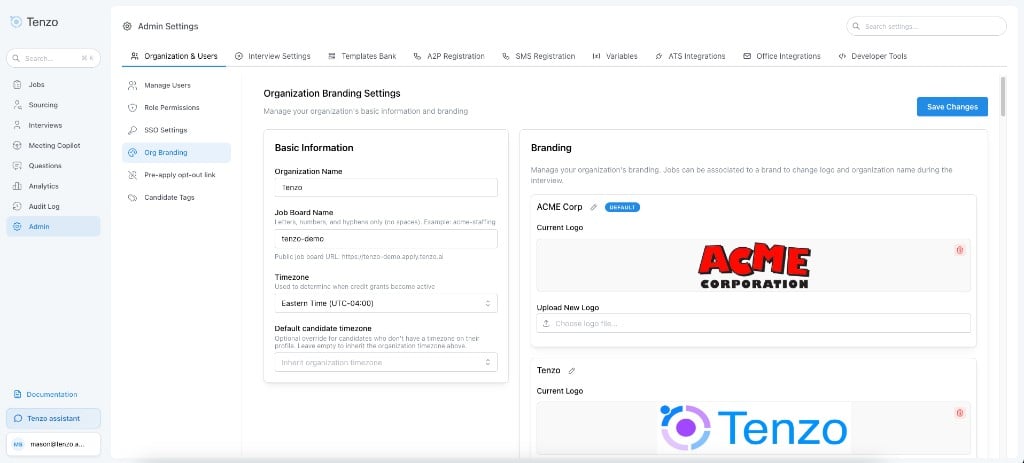
Admin → Organization & Users → Org Branding
1
Create brands
Under Branding, add a brand name and optional logo. Mark one brand as Default. You cannot delete the default brand; set a different default first.
2
Keep organization name as the tenant name
Organization Name on the same page stays the internal name for your Tenzo account. It is the fallback if no brands are configured, and it is what recruiters see in Admin.
3
Select a brand on each job
Open Job → Configure → Settings → Branding Settings → Brand. Choose which brand this job should present to candidates.

Brand setting on a job
What candidates see
The selected brand (or the default, or the organization name) is used anywhere a candidate is told who is hiring them:
If no logo is uploaded, Tenzo shows its own mark.
{{company_name}} in templates
Use {{company_name}} in call scripts, emails, SMS, and calendar event bodies to refer to the hiring company. At send time it resolves to:
- The job’s selected brand name
- Else the organization’s default brand name
- Else the organization name
Templates
Brand is a job identity field.- Script templates: when Apply settings changes is on, the template brand is copied onto selected jobs.
- Hybrid templates: brand stays job-local even when settings are applied.
Related
- Available Interview Settings — Brand setting on a job
- Custom Pronunciations — Teach the interviewer how to say a brand name
- Interview Customization —
{{company_name}}and other template variables