

Email Integration Uses
Once your email has been connected, candidates can communicate with Morgan over email to schedule interviews and ask questions about the role. The email integration may be used for both video and phone interviews. Video Interviews When connected, your custom recruiting domain will be used to send candidates interview links. If not connected, candidates will still receive emails with links to the video interview from the ‘tenzo.ai’ domain, but connecting a custom email is preferred by most customers to ensure consistent branding for candidate communication. Phone Screens If a candidate does not answer the initial phone call, Morgan may be configured to reach out again over SMS and email to schedule a call and perform the initial screen. If you have connected a designated recruiting email domain, Morgan will not only reach out over SMS but will also email candidates to attempt to schedule a phone interview.Link A Recruiting Email
To link your email, navigate to the Admin > Office Integrations > Email Integrations page.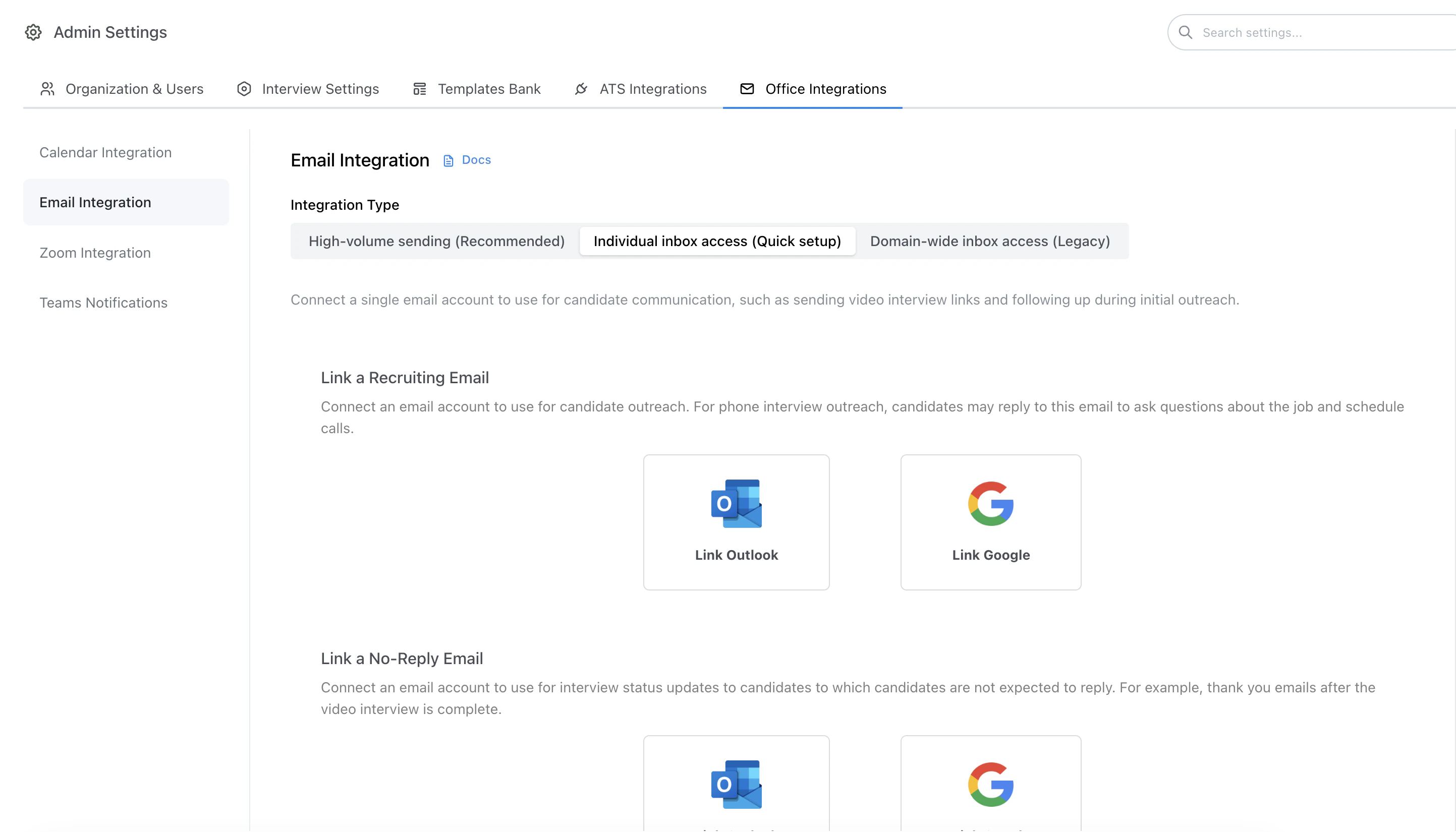
Admin > Office Integrations > Email Integration
Choose an integration type
- Individual inbox access (Quick setup): fastest setup; connect one or more specific inboxes that Tenzo can send from. Best for lower-volume sending.
- High-volume sending: requires DNS changes; best when you need high-volume outbound or when Outlook/Gmail throttling becomes a problem. (Docs)
- Domain-wide inbox access (Legacy): older admin-wide tenant connection; still supported but generally not recommended since allowing access to all inboxes is not required for outreach.
Quick setup: Connect a single recruiting inbox (and optional no-reply inbox)
Connecting an individual inbox is the fastest way to get started because it typically does not require DNS changes. It’s a great fit for lower-volume recruiting email and teams that want messages to come “from an inbox”.Typical setup:
- Recruiting inbox (required): used for candidate communication (video interview links and outreach).
- No-reply inbox (optional): used for no-reply style notifications, if configured.
High-volume guidance (typical provider caps):
- Google Workspace (Gmail): up to ~2,000 recipients/day per user (consumer Gmail accounts are typically lower, ~500/day).
- Microsoft Exchange Online (Outlook/Office 365): up to ~10,000 recipients/day per mailbox but practical limits can be as low as a few hundred / day.
Migrating between integration types: Temporarily deactivate any connected emails in your current integration section, then reconnect using your preferred integration type (Individual inbox / High-volume / Domain-wide).
Still supported (not recommended): Domain-wide access
Tenzo still supports the older domain-wide connection flow where an admin grants access across the organization’s email directory. This is generally not recommended because it grants broader access than most organizations need.High-volume sending (recommended when throttling is a problem)
If you run into Outlook/Gmail throttling or need higher outbound volume, use Tenzo’s High-volume email sending option. Read: High-volume email sendingAction required emails (admins + support)
When outbound email needs attention from your team, Tenzo emails org admins from support@tenzo.ai and BCC’s support@tenzo.ai so we see the same notice. You can reply to that email if you need help. Reminders are rate-limited while the problem continues (typically at most once per day; unfinished high-volume DNS reminders are at most once every three days).Reconnecting an expired inbox
Individual inbox connections (Google or Microsoft) can expire or be revoked — for example after a password change, an admin revoking app access, or a long period of inactivity. When Tenzo can no longer send from a connected recruiting inbox:- Org admins and the affected mailbox receive an email asking them to reconnect, with a link to Admin Settings → Office Integrations → Email.
- Until the inbox is reconnected, candidate emails for that mailbox are sent from a generic Tenzo address instead of your branded address.
Sending limits / throttling
If Google, Microsoft, or SendGrid returns a rate-limit or sending-quota error while Tenzo tries to deliver candidate email, org admins receive an action-needed email describing the affected mailbox or domain. Reduce volume, wait for the provider limit to reset, or switch to high-volume email sending if you need sustained higher throughput.High-volume DNS not finished
If high-volume (SendGrid-managed) email is set up but DNS is still unverified or validation fails, org admins are emailed to finish DNS under Admin Settings → Office Integrations → Email. Unfinished DNS setup is not alerted during the first two days after the integration is created (so first-time setup is not noisy); after that, reminders are at most once every three days while status stays pending. Validation errors alert immediately. Until the domain is ACTIVE, Tenzo cannot send from that managed domain.Customize Email Outreach for Phone Interviews
The initial outreach email sent to candidates may be customized for any role in the Initial Email step. Email outreach may also be enabled or disabled for any role in this step.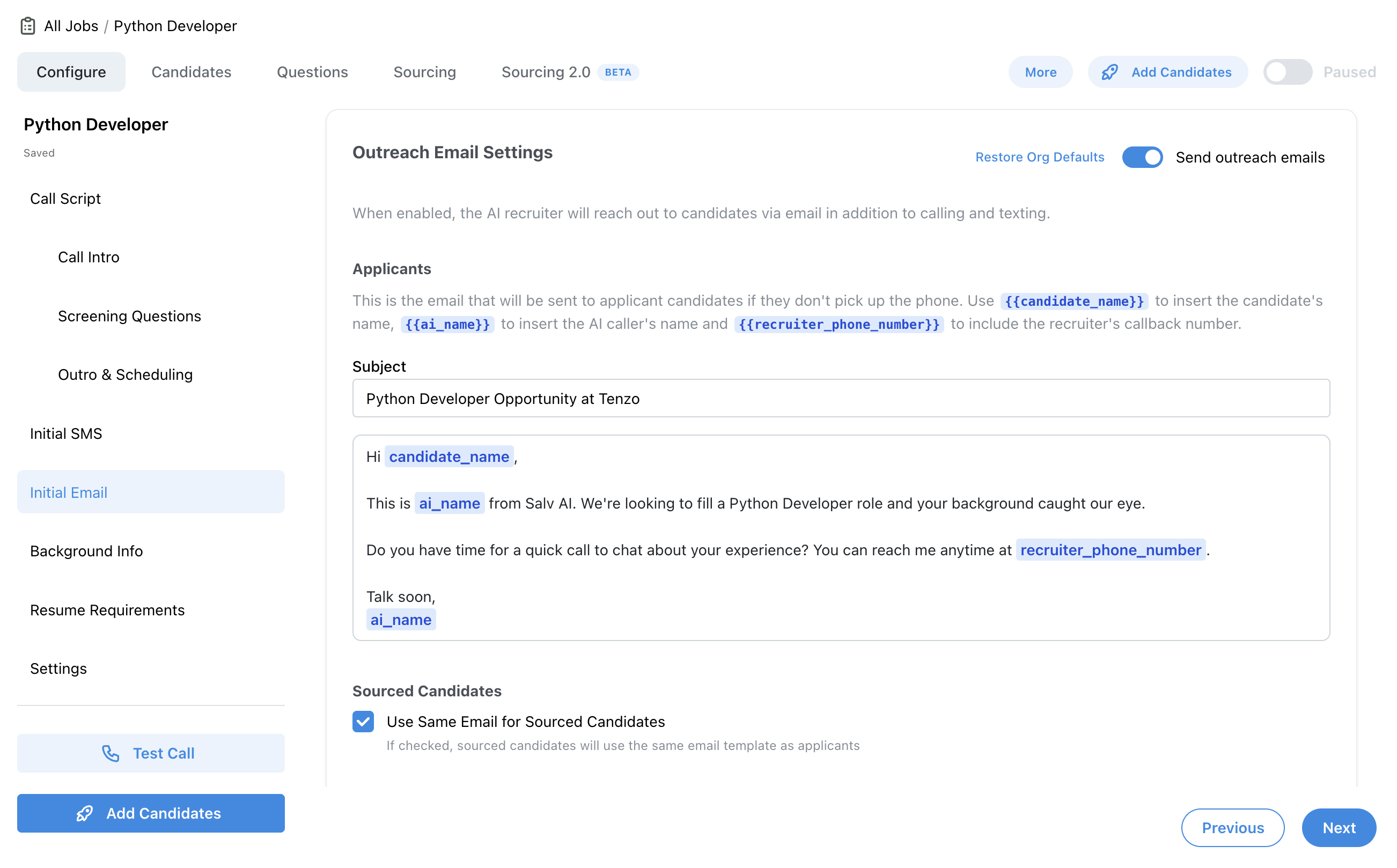
Job > Configure > Initial Email