

Overview
Tenzo connects to Google or Microsoft calendars so Morgan can check recruiter availability and schedule follow-up interviews with candidates who pass the AI screen. Follow-up events can include Teams, Google Meet, or Zoom links and custom event bodies. Before recruiters can be assigned as follow-up interviewers, your organization admin must choose how calendars are connected.Choose a connection type
An admin selects the connection type under Admin > Office Integrations > Calendar Integration.Domain-wide calendar integration
Domain-wide integration is the default setup: one workspace administrator grants Tenzo access to the organization’s calendar directory. This allows global calendar access using a single connection managed in Admin Settings.Connect domain-wide calendars
1
Select domain-wide connection type
In Admin > Office Integrations > Calendar Integration, set Connection type to Domain-wide (workspace admin).
2
Connect Google or Outlook
A user with Google Workspace or Microsoft 365 admin permissions connects the organization’s calendar directory using Connect Google Calendar or Connect Outlook Calendar.
3
Grant directory access
Complete the provider’s admin consent flow so Tenzo can read calendars across your organization. For Google, follow the in-product validation steps to confirm domain-wide delegation.
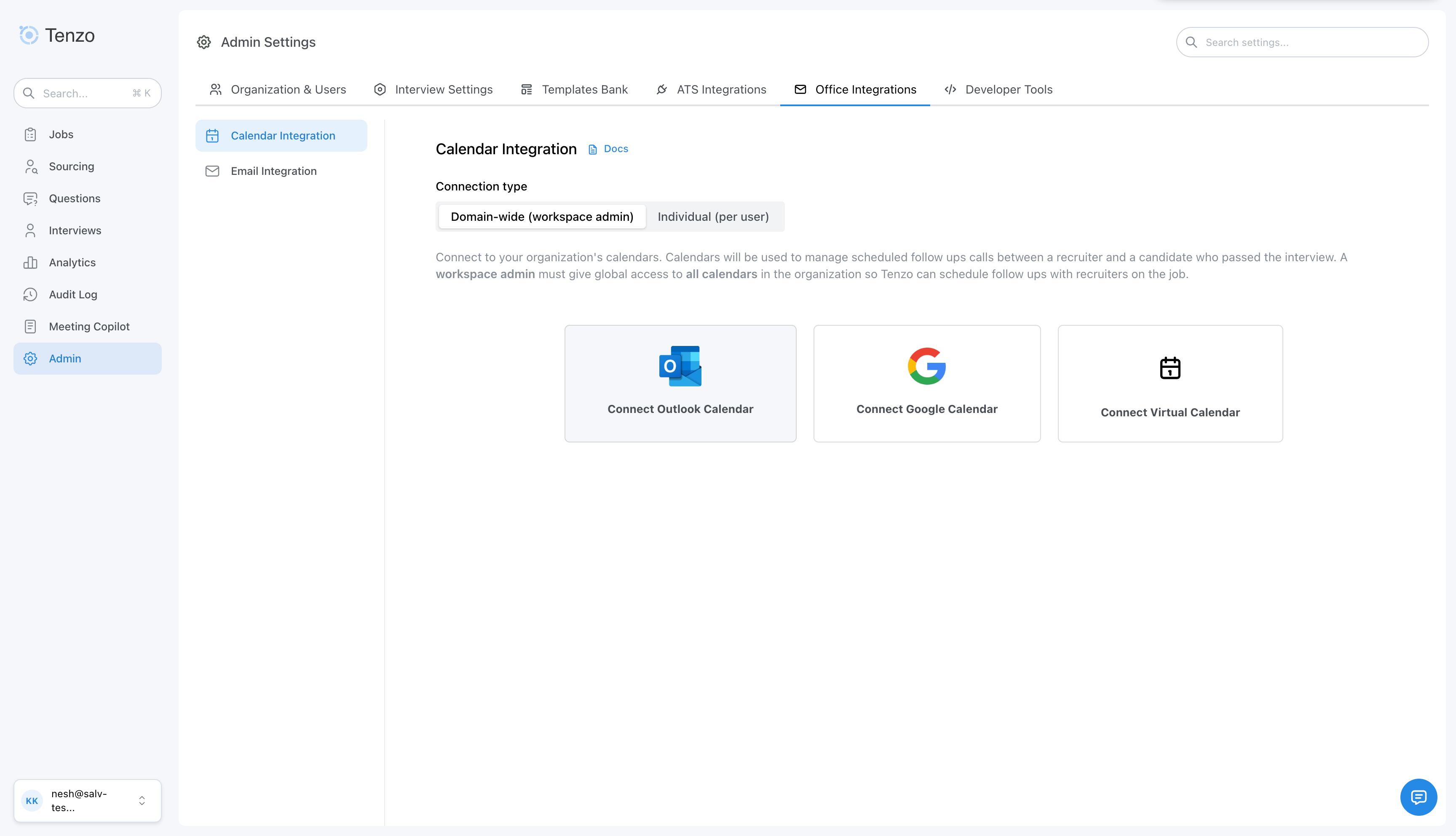
Admin > Office Integrations > Calendar Integration — domain-wide
Individual calendar integration
Individual integration lets each recruiter connect only their own work calendar. No workspace-wide calendar admin consent is required for the whole directory. Each user signs in with OAuth, similar to individual email inbox access. Individual mode is a separate connection type from domain-wide, not a step within it. When individual mode is selected there is no tenant-level authorization step — the admin only sets the connection type, and each recruiter authorizes their own calendar.What Tenzo can access (individual mode)
Each recruiter grants Tenzo delegated, per-user access to their own mailbox only. For Microsoft 365, the sign-in requests these delegated scopes:Calendars.ReadWrite— read availability and create, reschedule, and delete follow-up interview eventsUser.Read— read the connecting user’s own profile to identify which mailbox was connectedoffline_access— refresh access in the background so availability checks keep working
Seeing an Enterprise Application in Microsoft Entra? The first time anyone
in your tenant connects, Microsoft automatically provisions an Enterprise
Application (a service principal) for Tenzo. This is standard Azure behavior
for any OAuth app and does not grant tenant-wide access or application
permissions — in individual mode each connection is limited to that one user’s
delegated calendar access.
Tenzo does not request org-wide admin consent in individual mode. If a
recruiter sees an admin approval prompt during sign-in, that comes from
your tenant’s own user-consent policy (for example, “users can’t consent to
apps” or an admin consent workflow), not from Tenzo. Any approval granted
still covers only the per-user delegated scopes listed above.
Set up individual mode (admin)
1
Enable individual connection type
In Admin > Office Integrations > Calendar Integration, set Connection type to Individual (per user) and confirm the switch. Any existing domain-wide calendar connection will be removed.
2
Direct recruiters to User Settings
The admin page shows a link to User Settings → Calendar. Share that path with recruiters who should receive follow-up interviews.
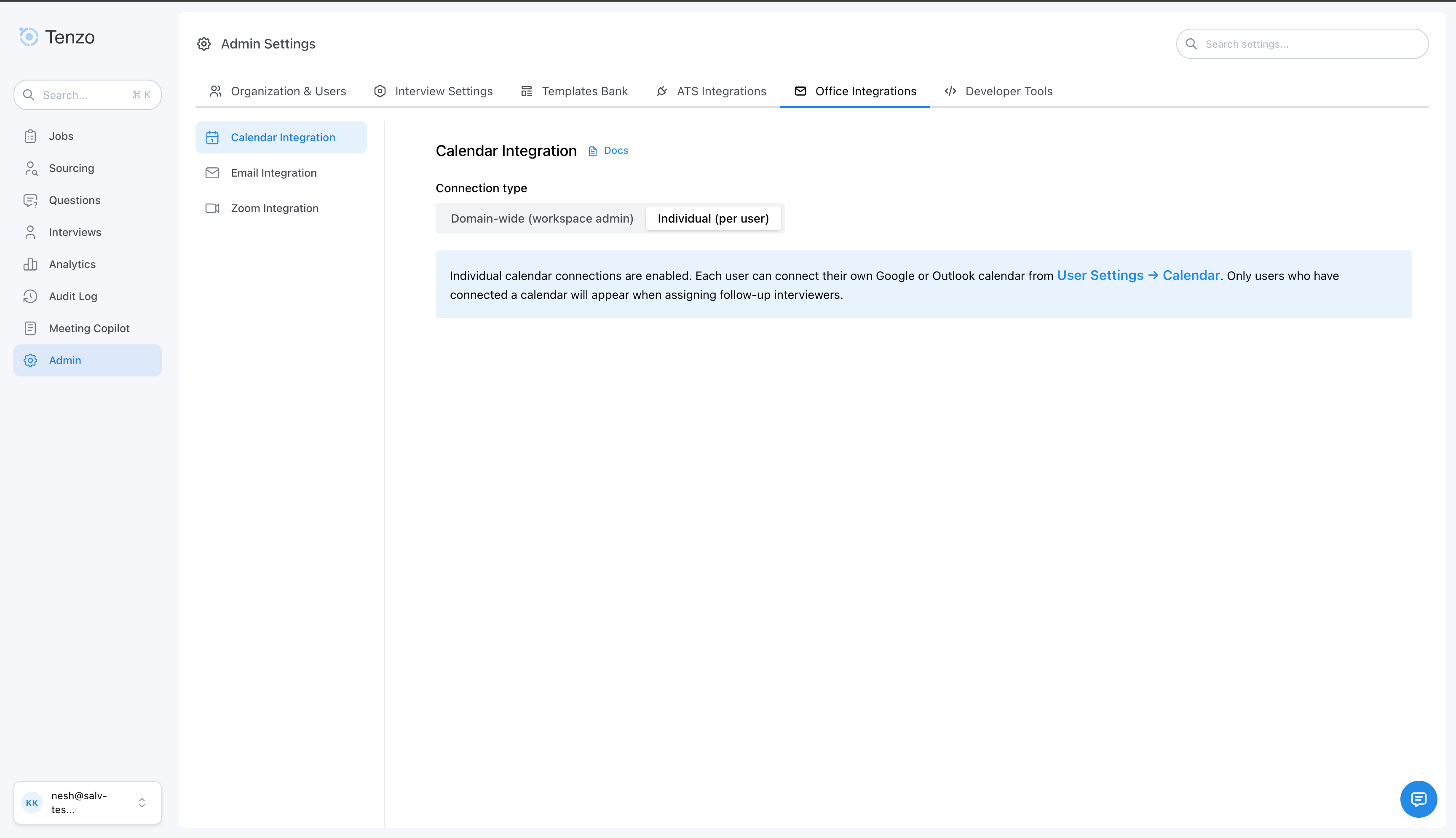
Admin > Office Integrations > Calendar Integration — individual mode
In individual mode, the admin Calendar Integration page does not connect a
calendar for the whole org. Only per-user connections in User Settings count.
Connect a calendar (each recruiter)
Each recruiter who may be assigned follow-up interviews should connect their calendar:1
Open User Settings
Open the user menu (top right) and choose User Settings, or go to
/user-settings?tab=calendar.2
Connect Google or Outlook
On the Calendar tab, choose Connect Google Calendar or Connect
Outlook Calendar and complete the OAuth sign-in for your work account.
3
Set availability (optional)
After connecting, open the Calendar Availability tab to configure when
you are available for follow-up interviews.
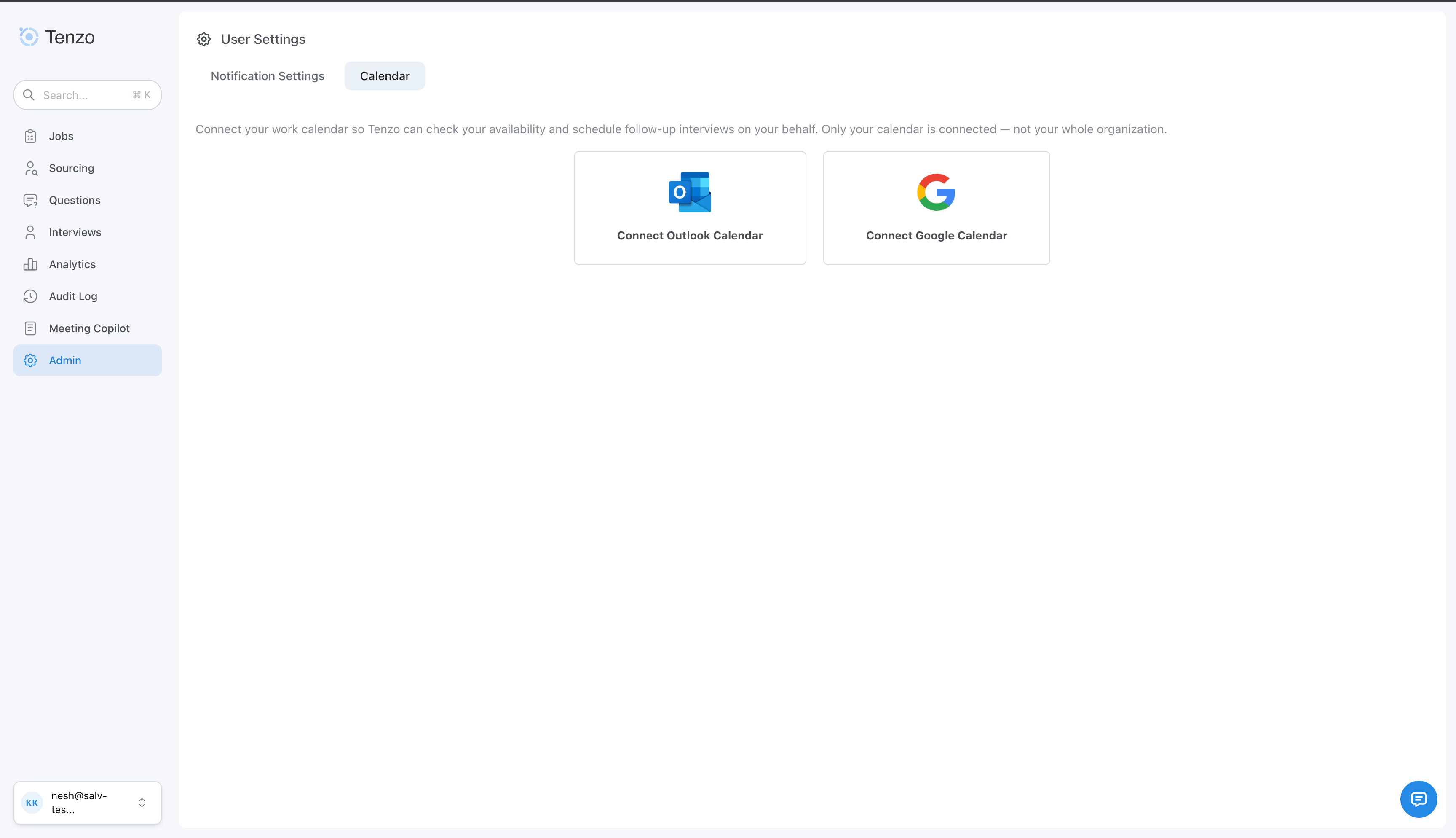
User Settings > Calendar
Only users who have connected a calendar appear when assigning follow-up
interviewers on a job or in the Rules Engine. Users without a connection are
skipped for availability and round-robin selection.
Action required: calendar disconnected while scheduling is on
If Schedule Follow-Up Interviews is enabled for a job but Tenzo has no working calendar connection (for example the org calendar was disconnected, or an individual OAuth grant expired), org admins receive an email from support@tenzo.ai with a reconnect link:- Domain-wide calendar: Admin Settings → Office Integrations → Calendar
- Individual calendar: User Settings → Calendar (the affected recruiter’s mailbox is also included on the email)
- Tenzo BCC’s support@tenzo.ai so we see the same notice.
- While the issue continues, Tenzo may send the same reminder again at most once per day when scheduling is attempted or a token refresh fails.
- Until a calendar is connected again, candidates cannot book follow-up interview times for jobs that rely on calendar availability.
Enabling automatic follow-up interviews
Turn on Schedule Follow-Up Interviews for any job in the Outro and Scheduling step of the job configure page.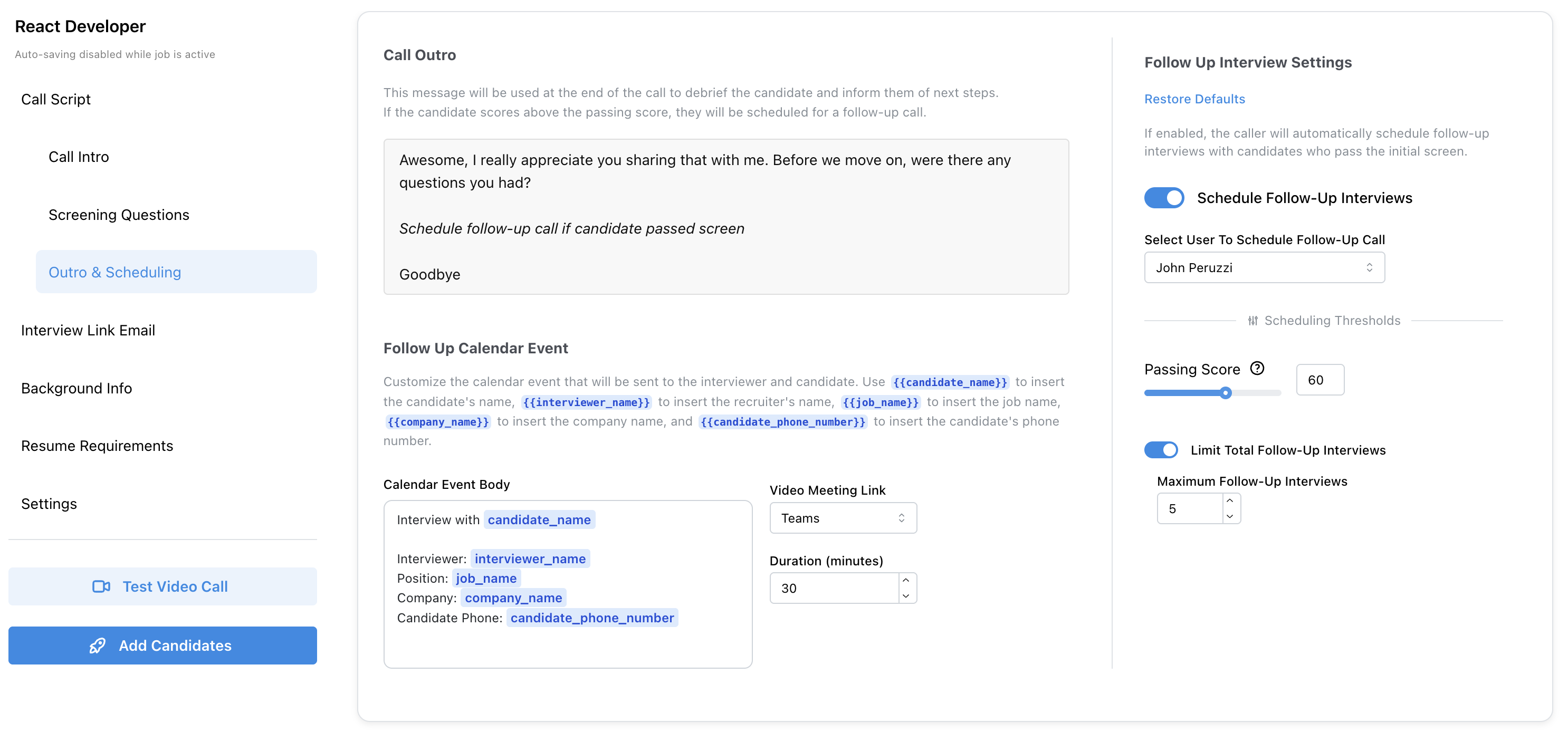
Jobs > Configure Tab > Outro & Scheduling
- Total number of follow-up interviews scheduled per job (after the limit, Morgan ends interviews by saying she will be in touch)
- Passing score threshold
- Meeting location: for domain-wide calendars, Teams, Google Meet, Zoom, phone, or onsite. For individual calendars, Video (resolves to the selected follow-up user’s Teams or Meet, or falls back to a phone interview), phone, or onsite.
- Meeting duration and event description
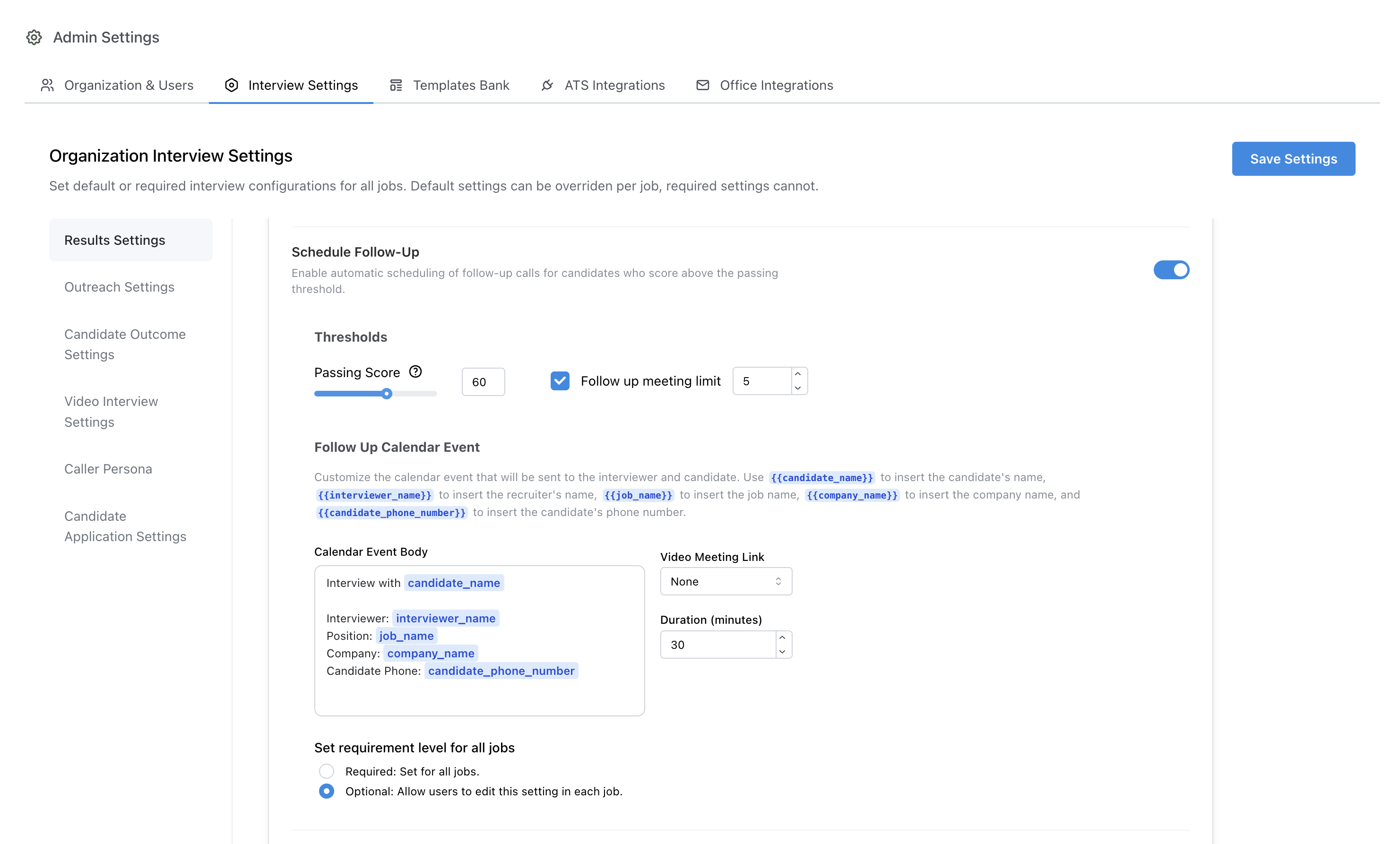
Admin > Interview Settings > Schedule Follow-Up
How calendar round-robin works
When multiple follow-up users are assigned to a job, the system chooses who receives each new interview using round-robin logic to balance load.- Availability — Only users who are free at the candidate’s requested time (according to their connected calendar) are considered. Users with a conflict at that time are skipped.
- Weekly balance — Among available users, the system counts how many follow-up interviews each person already has this week for that job (Sunday 00:00 UTC through Saturday 23:59 UTC).
- Selection — The user with the lowest weekly count is chosen. Ties are broken at random.
- Rescheduling — If a candidate reschedules an existing follow-up, the same interviewer is kept; round-robin applies only to new assignments.