> ## Documentation Index
> Fetch the complete documentation index at: https://f4c7a9e2d8b1-docs.tenzo.ai/llms.txt
> Use this file to discover all available pages before exploring further.
# High-volume email sending
> Configure high-volume outbound email from your domain when Outlook/Gmail throttling is a problem
## When to use high-volume sending
Use **High-volume email sending** when you see throttling, delayed delivery, or reduced deliverability using inbox-based sending (Microsoft/Google). This option is designed for **transactional / recruiting outreach at scale**, while still sending **from your domain**.
## This setup requires DNS changes
Unlike inbox-based sending (Microsoft/Google OAuth), high-volume sending **requires updating your DNS** so Tenzo can:
* **Send authenticated email** from your domain (SPF/DKIM)
* **Receive candidate replies** so Tenzo can continue the conversation
## What this changes (and what it doesn’t)
* **From**: candidates see emails coming from the recruiting email address you configure (e.g. `morgan@recruiting.company.com`).
* **Reply experience**: candidates can hit “Reply” normally and Tenzo will receive replies to continue the conversation.
* **Inbox visibility**: emails are not sent “from an employee mailbox” (so they may not appear in Outlook/Gmail Sent Items).
## Optional: use a subdomain
Using a subdomain is **optional**, but it’s often a good idea because it can:
* **Isolate reputation**: keeps recruiting/outreach traffic separate from your main corporate email traffic
* **Reduce operational risk**: makes it easier to roll back or adjust recruiting email settings without touching your primary domain
* **Simplify deliverability work**: clearer DNS/auth boundaries for recruiting email
Examples:
* `morgan@recruiting.company.com`
* `recruiting@company.com`
## DKIM selector conflicts (SendGrid)
Some customers already have DKIM records on their base domain from other email providers. SendGrid’s default DKIM selectors (`s1` / `s2`) can conflict with those existing records.
Tenzo automatically generates a **unique DKIM selector** for your setup to avoid collisions. When you use a recruiting subdomain, Tenzo keeps the SendGrid authentication records scoped to that recruiting subdomain.
## Setup steps
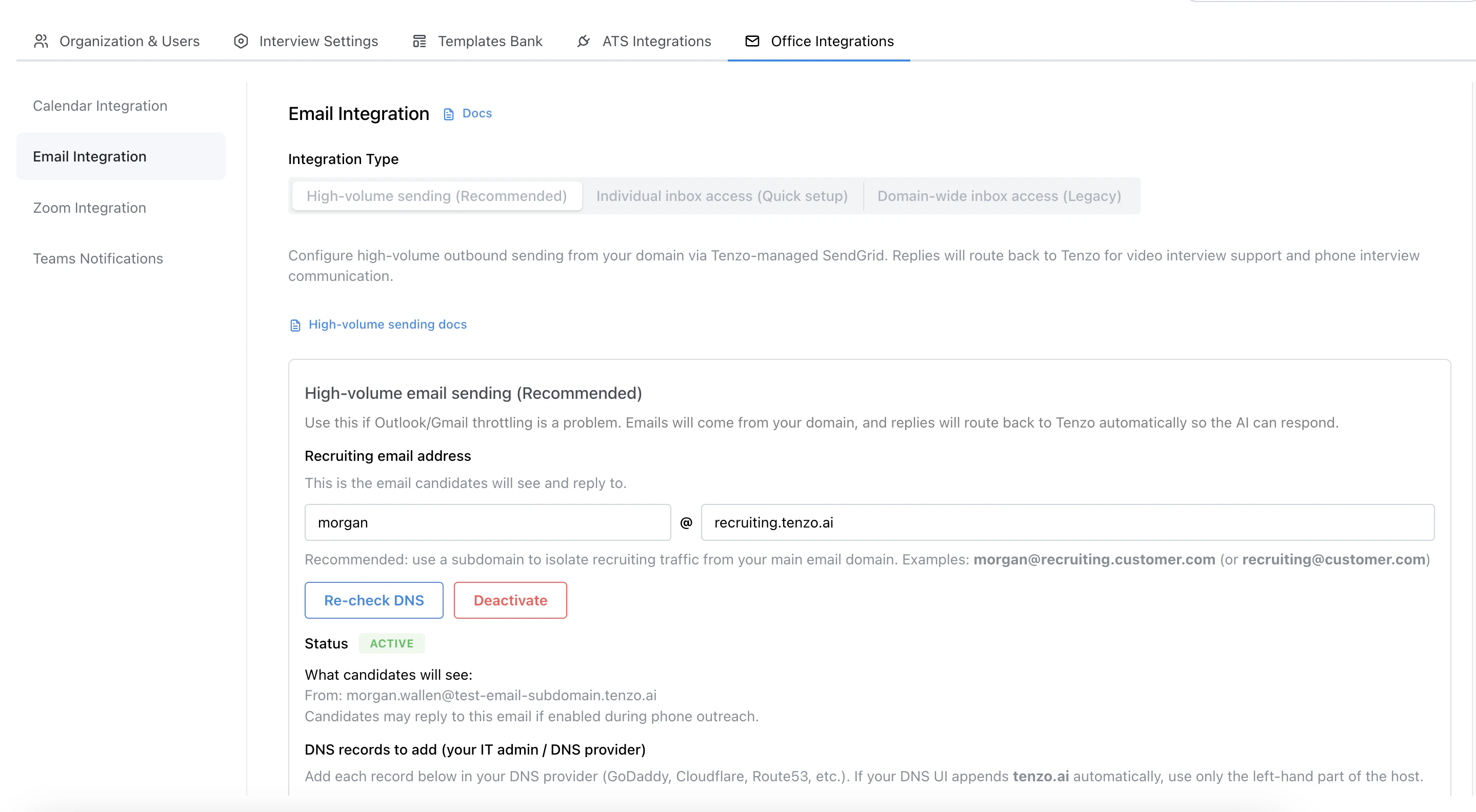
1. In Tenzo, go to **Admin → Office Integrations → Email Integrations**
2. Select **High-volume sending (Recommended)**
3. Enter your recruiting email address
4. Choose **Inbound reply routing**:
* **Dedicated reply subdomain** (recommended if sending from a root domain to protect your main corporate email), or
* **Use sending subdomain directly** (recommended if you already send from a Tenzo-dedicated recruiting subdomain)
5. Click **Begin setup**
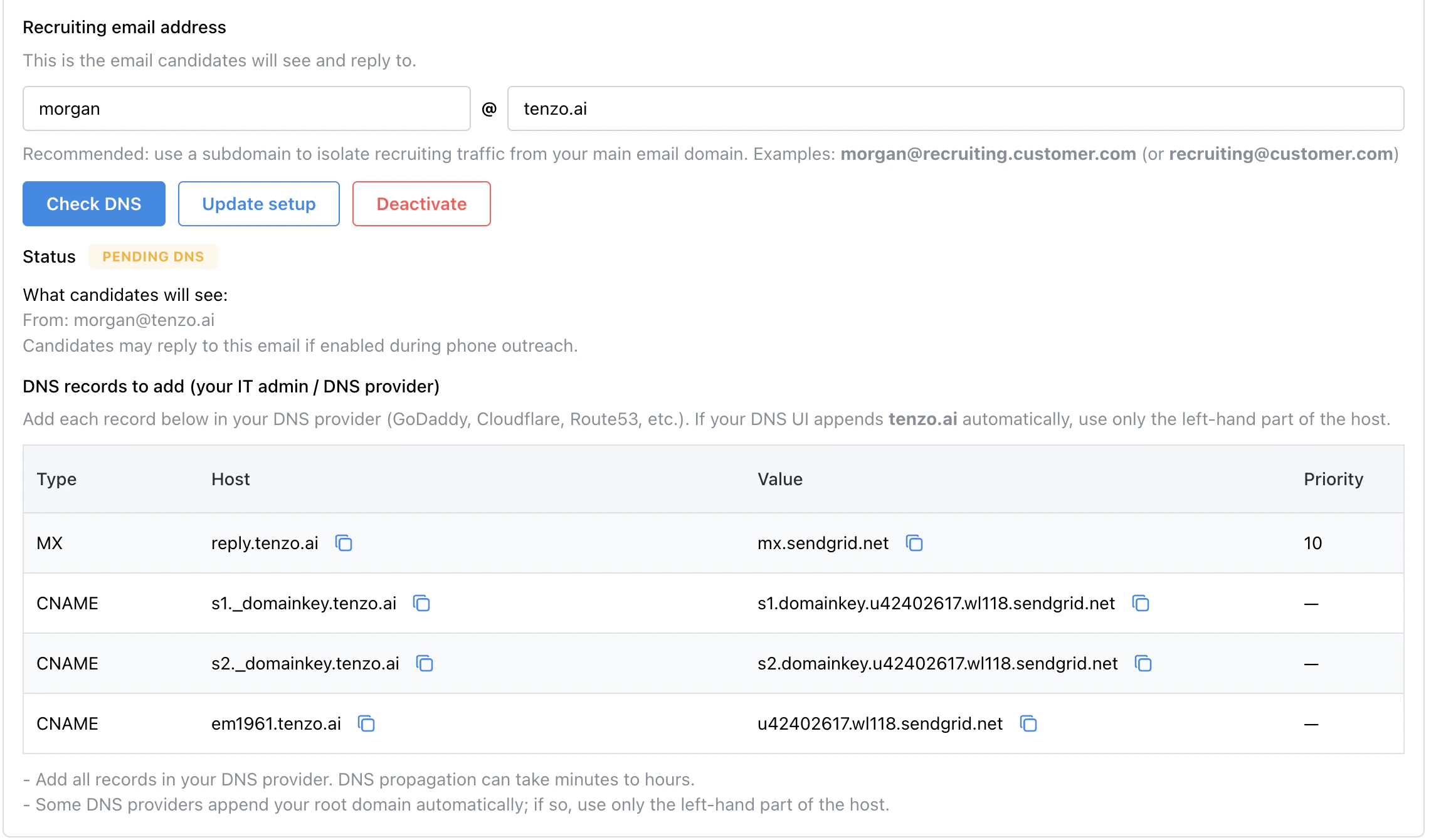
6. Add the DNS records Tenzo shows (SPF/DKIM and the inbound MX record)
7. After DNS propagates, click **Check DNS**
 ## DNS records (what they do)
Tenzo will show the exact DNS records to add. Common records include:
* **DKIM (CNAME)**: enables cryptographic signing for your domain
* **SPF (TXT)**: authorizes Tenzo’s sending infrastructure for your domain
* **Inbound MX record**: routes candidate replies back to Tenzo
### Inbound reply routing options
When you set up high-volume email, choose how candidate replies are routed in DNS:
| Option | MX hostname | Best for |
| ------------------------------------------------------------------------------------------ | ----------------------------- | ---------------------------------------------------------------------------------------------------------------------------------------------------------- |
| **Dedicated reply subdomain** (recommended if sending from a root domain) | `reply.` | Protects your root domain’s existing email. Tenzo automatically configures reply addresses on the `reply` subdomain so candidate replies are routed there. |
| **Use sending subdomain directly** (recommended if already on a Tenzo-dedicated subdomain) | `` | Recruiting subdomains dedicated to Tenzo only, especially when your DNS provider requires MX on the zone apex. |
Examples if you send from `recruiting.customer.com`:
* Dedicated reply subdomain → MX on `reply.recruiting.customer.com`. Candidate replies go to addresses like `recruiting+code@reply.recruiting.customer.com`.
* Use sending subdomain directly → MX on `recruiting.customer.com`
Root-domain senders (for example `recruiting@customer.com`) must use the dedicated reply subdomain option so your main corporate email MX is not affected.
## DNS records (what they do)
Tenzo will show the exact DNS records to add. Common records include:
* **DKIM (CNAME)**: enables cryptographic signing for your domain
* **SPF (TXT)**: authorizes Tenzo’s sending infrastructure for your domain
* **Inbound MX record**: routes candidate replies back to Tenzo
### Inbound reply routing options
When you set up high-volume email, choose how candidate replies are routed in DNS:
| Option | MX hostname | Best for |
| ------------------------------------------------------------------------------------------ | ----------------------------- | ---------------------------------------------------------------------------------------------------------------------------------------------------------- |
| **Dedicated reply subdomain** (recommended if sending from a root domain) | `reply.` | Protects your root domain’s existing email. Tenzo automatically configures reply addresses on the `reply` subdomain so candidate replies are routed there. |
| **Use sending subdomain directly** (recommended if already on a Tenzo-dedicated subdomain) | `` | Recruiting subdomains dedicated to Tenzo only, especially when your DNS provider requires MX on the zone apex. |
Examples if you send from `recruiting.customer.com`:
* Dedicated reply subdomain → MX on `reply.recruiting.customer.com`. Candidate replies go to addresses like `recruiting+code@reply.recruiting.customer.com`.
* Use sending subdomain directly → MX on `recruiting.customer.com`
Root-domain senders (for example `recruiting@customer.com`) must use the dedicated reply subdomain option so your main corporate email MX is not affected.
 ## Why inbox-based sending can throttle at high volumes
When you connect an individual inbox (or domain-wide access), Tenzo is sending “as a mailbox user” in Microsoft/Google. Those providers apply **per-user/mailbox sending limits** and **anti-abuse controls** that can trigger throttling.
Typical caps (varies by tenant/account and can be lower in practice):
* **Google Workspace (Gmail)**: up to **\~2,000 recipients/day** per user (consumer Gmail accounts are typically lower, \~500/day)
* **Microsoft Exchange Online**: published limits can be higher (e.g. \~10,000 recipients/day), but **practical anti-abuse limits for external recipients may be much lower** for some tenants/mailboxes (for example, you may see alerts around a few hundred external recipients/day).
## Troubleshooting
### DNS says “not verified”
* DNS changes can take time to propagate; try again in 10–30 minutes.
* Double-check there are no typos in Host/Value.
## Why inbox-based sending can throttle at high volumes
When you connect an individual inbox (or domain-wide access), Tenzo is sending “as a mailbox user” in Microsoft/Google. Those providers apply **per-user/mailbox sending limits** and **anti-abuse controls** that can trigger throttling.
Typical caps (varies by tenant/account and can be lower in practice):
* **Google Workspace (Gmail)**: up to **\~2,000 recipients/day** per user (consumer Gmail accounts are typically lower, \~500/day)
* **Microsoft Exchange Online**: published limits can be higher (e.g. \~10,000 recipients/day), but **practical anti-abuse limits for external recipients may be much lower** for some tenants/mailboxes (for example, you may see alerts around a few hundred external recipients/day).
## Troubleshooting
### DNS says “not verified”
* DNS changes can take time to propagate; try again in 10–30 minutes.
* Double-check there are no typos in Host/Value.