> ## Documentation Index
> Fetch the complete documentation index at: https://f4c7a9e2d8b1-docs.tenzo.ai/llms.txt
> Use this file to discover all available pages before exploring further.
# Screening Questions
> Understand how interview questions are structured, configured, and used for evaluation
## Screening Questions
Screening questions are the core evaluation step in an interview. They are where you decide what
Tenzo should ask candidates, how Tenzo should follow up, and how each answer should be graded.
Use this guide with **[Interview Customization](/getting-started/advanced-create-interview)** when
you need a deeper understanding of the question step.
## How Screening Questions Are Used
Each screening question can affect three parts of the interview:
* **Candidate experience:** What the candidate is asked during the interview.
* **Follow-up behavior:** Whether Tenzo asks for more detail after the candidate answers.
* **Evaluation:** How the answer is graded and how much it affects the candidate's score.
Review each question as both a candidate-facing prompt and an evaluation rule. The wording should be
clear to candidates, while the settings and grading instructions should be precise enough for
consistent scoring.
## Question Types
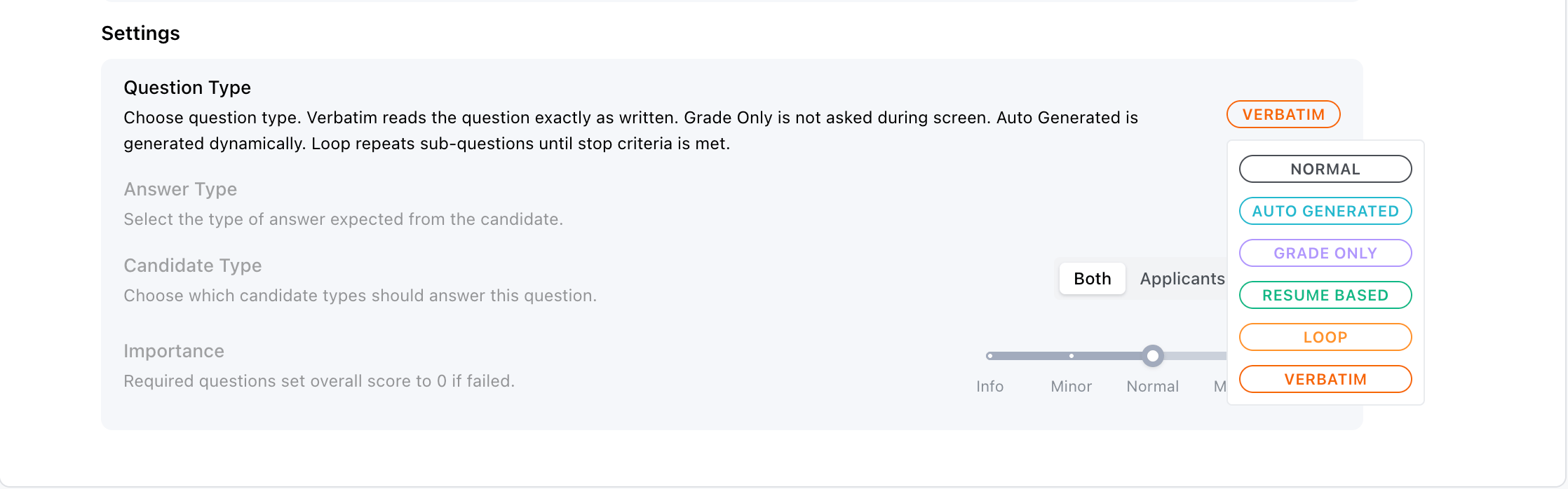
Question type controls how the question participates in the interview. Most questions are
**Normal**, but the other types are useful when the question should be generated dynamically or
graded differently.
 ### Normal Questions
Normal questions are asked directly during the interview. Use them for most screening topics:
experience, work authorization, availability, certifications, commute, motivation, or role-specific
skills.
Normal questions can use any answer type.
### Verbatim Questions
Verbatim questions are asked directly during the interview, but Tenzo must read the question text
exactly as written. Use them for legal disclosures, EEOC statements, consent language, and other
compliance scripts where paraphrasing is not acceptable.
Verbatim questions can use any answer type and optional follow-ups.
### Grade Only Questions
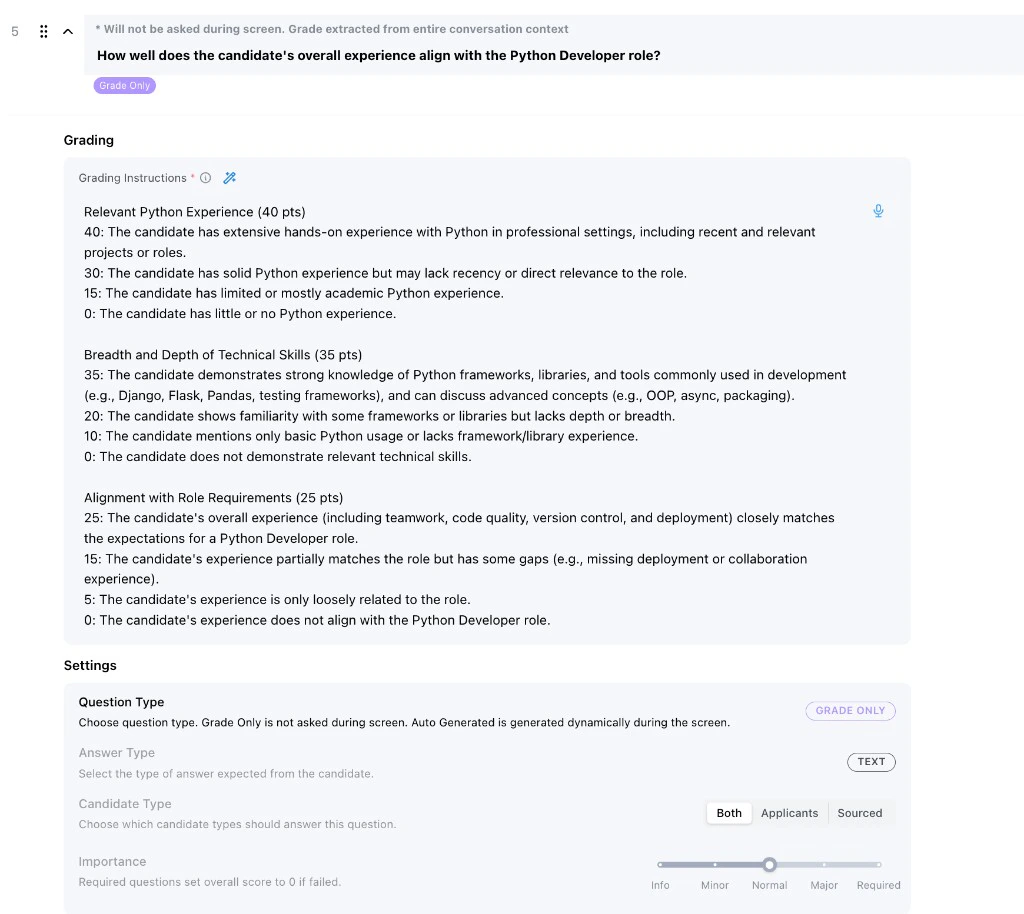
Grade Only questions are not asked during the interview. Instead, Tenzo grades them from the
conversation transcript after the interview is complete.
Use Grade Only questions when you want an overall evaluation that should not be asked as a literal
question. For example, you might grade how well the candidate's overall experience aligns with the
role after reviewing the full conversation.
### Normal Questions
Normal questions are asked directly during the interview. Use them for most screening topics:
experience, work authorization, availability, certifications, commute, motivation, or role-specific
skills.
Normal questions can use any answer type.
### Verbatim Questions
Verbatim questions are asked directly during the interview, but Tenzo must read the question text
exactly as written. Use them for legal disclosures, EEOC statements, consent language, and other
compliance scripts where paraphrasing is not acceptable.
Verbatim questions can use any answer type and optional follow-ups.
### Grade Only Questions
Grade Only questions are not asked during the interview. Instead, Tenzo grades them from the
conversation transcript after the interview is complete.
Use Grade Only questions when you want an overall evaluation that should not be asked as a literal
question. For example, you might grade how well the candidate's overall experience aligns with the
role after reviewing the full conversation.
 ### Resume Based Questions
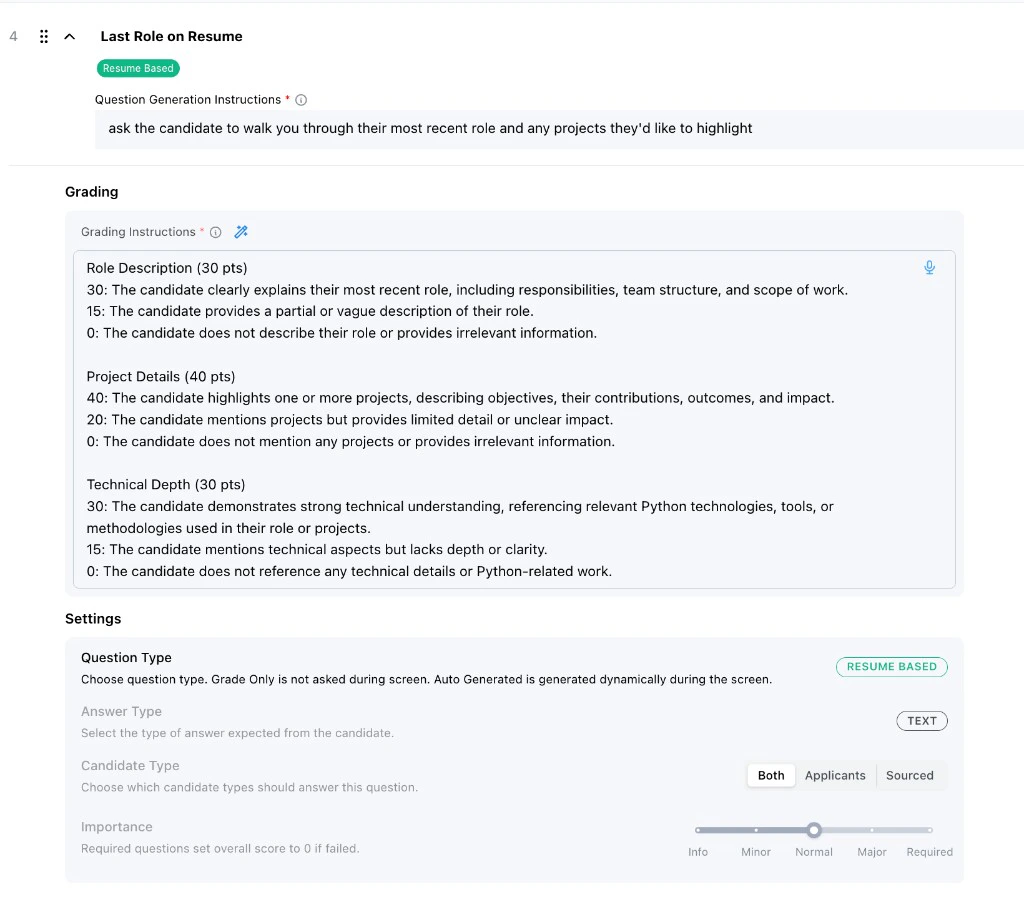
Resume Based questions are generated from or grounded in the candidate's resume. They let Tenzo ask
about resume-specific details, such as the candidate's most recent role or a project listed on the
resume.
Use Resume Based questions when the best question depends on the candidate's background. The
question generation instructions tell Tenzo what to look for in the resume and how to turn it into a
candidate-facing question.
### Resume Based Questions
Resume Based questions are generated from or grounded in the candidate's resume. They let Tenzo ask
about resume-specific details, such as the candidate's most recent role or a project listed on the
resume.
Use Resume Based questions when the best question depends on the candidate's background. The
question generation instructions tell Tenzo what to look for in the resume and how to turn it into a
candidate-facing question.
 ### Auto Generated Questions
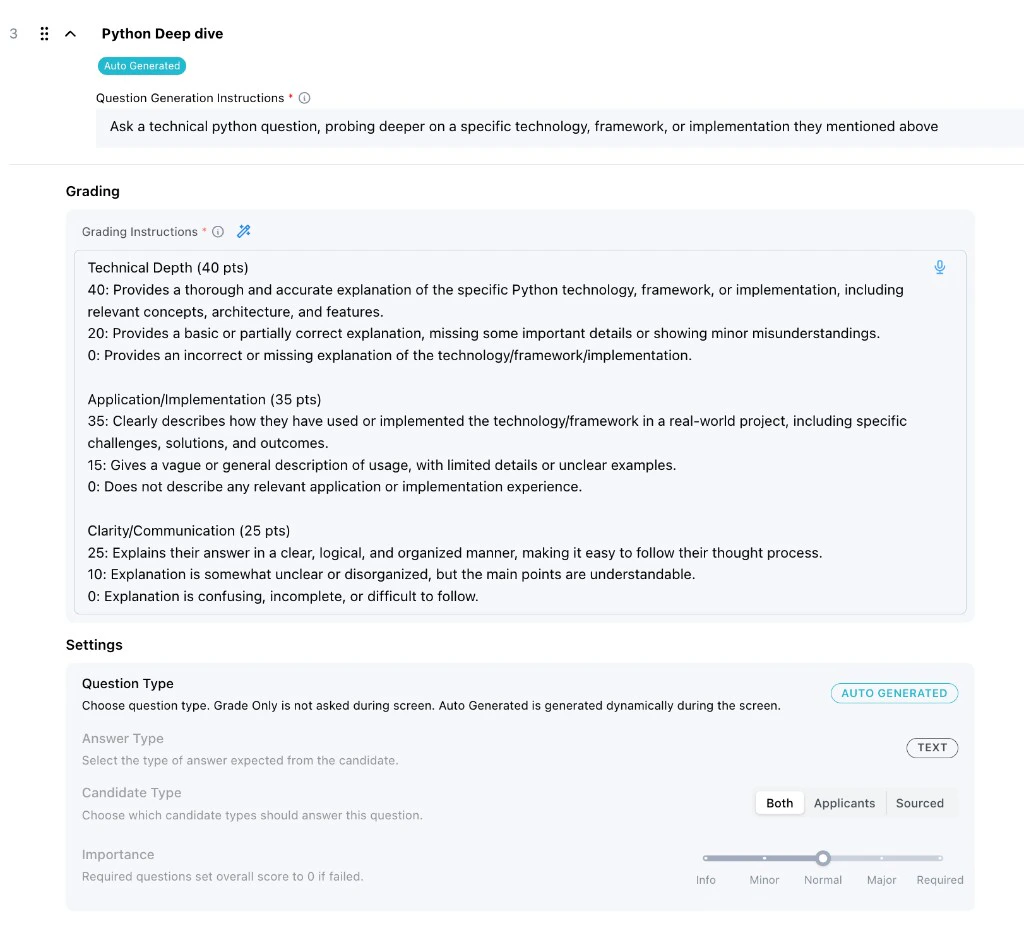
Auto Generated questions are created dynamically during the interview based on earlier conversation
context. They are useful for probing deeper into something the candidate already mentioned.
Use Auto Generated questions when the exact question cannot be known ahead of time, but you can
describe the kind of follow-up Tenzo should ask. For example, Tenzo can ask a technical deep-dive
question about a Python technology, framework, or implementation the candidate mentioned earlier.
Auto Generated questions are graded as their own questions. Use them when each dynamically generated
question should receive its own grade.
### Auto Generated Questions
Auto Generated questions are created dynamically during the interview based on earlier conversation
context. They are useful for probing deeper into something the candidate already mentioned.
Use Auto Generated questions when the exact question cannot be known ahead of time, but you can
describe the kind of follow-up Tenzo should ask. For example, Tenzo can ask a technical deep-dive
question about a Python technology, framework, or implementation the candidate mentioned earlier.
Auto Generated questions are graded as their own questions. Use them when each dynamically generated
question should receive its own grade.
 ### Loop Questions
Loop questions repeat a main question and its sub-questions across multiple iterations until a
stop criteria is satisfied. They are useful when you need to collect the same set of details for
multiple instances of something — for example, walking through each prior job until you have covered
a defined time range.
Configure a Loop question with:
* **Title** — label for the loop block in the script
* **First iteration question** — opening question for pass 1 only (e.g., ask about their most recent job)
* **Later iteration instructions** — how to ask on passes 2+ (e.g., probe the next earlier role until enough history is collected)
* **Sub-questions** — follow-up prompts asked on every iteration before evaluating whether to loop again
* **Stop criteria** — plain-language condition for when to stop iterating (e.g., "Stop when we have covered the last 5 years of work history")
During the interview, Tenzo may return to the same question IDs across iterations rather than
moving linearly to the next script question. The entire loop is graded as a single question based on
how thoroughly the candidate covered all iterations.
## Answer Types
Answer type tells Tenzo what format to expect from the candidate. Choose the answer type that best
matches how the answer should be evaluated.
### Loop Questions
Loop questions repeat a main question and its sub-questions across multiple iterations until a
stop criteria is satisfied. They are useful when you need to collect the same set of details for
multiple instances of something — for example, walking through each prior job until you have covered
a defined time range.
Configure a Loop question with:
* **Title** — label for the loop block in the script
* **First iteration question** — opening question for pass 1 only (e.g., ask about their most recent job)
* **Later iteration instructions** — how to ask on passes 2+ (e.g., probe the next earlier role until enough history is collected)
* **Sub-questions** — follow-up prompts asked on every iteration before evaluating whether to loop again
* **Stop criteria** — plain-language condition for when to stop iterating (e.g., "Stop when we have covered the last 5 years of work history")
During the interview, Tenzo may return to the same question IDs across iterations rather than
moving linearly to the next script question. The entire loop is graded as a single question based on
how thoroughly the candidate covered all iterations.
## Answer Types
Answer type tells Tenzo what format to expect from the candidate. Choose the answer type that best
matches how the answer should be evaluated.
 ### Text
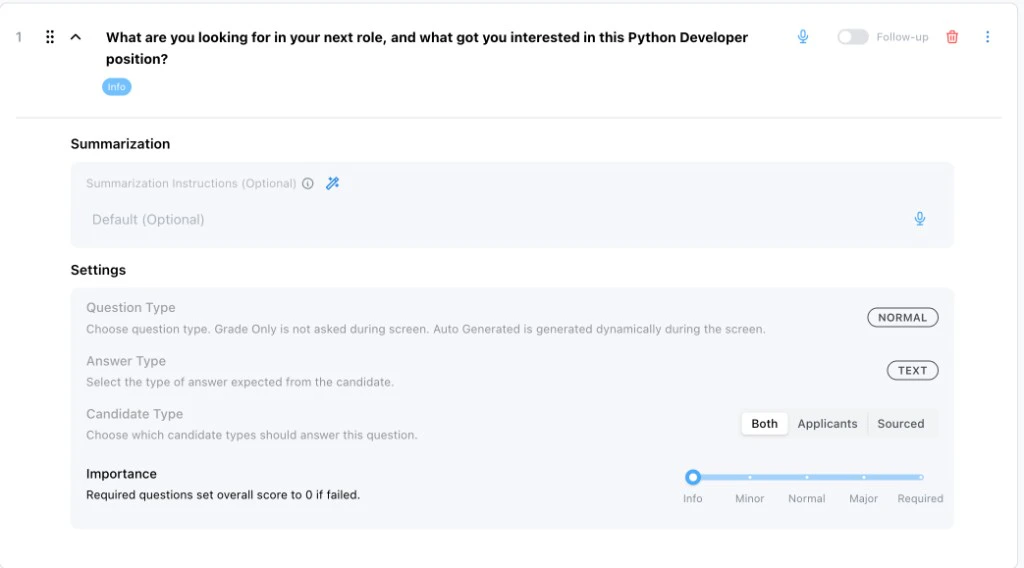
Text answers are open-ended. Use them for experience descriptions, motivation, project walkthroughs,
communication examples, or any answer that needs qualitative grading.
If the question is informational, set its importance to **Info** and use summarization instructions
instead of strict grading. This is useful when you want to collect context without penalizing the
candidate.
### Text
Text answers are open-ended. Use them for experience descriptions, motivation, project walkthroughs,
communication examples, or any answer that needs qualitative grading.
If the question is informational, set its importance to **Info** and use summarization instructions
instead of strict grading. This is useful when you want to collect context without penalizing the
candidate.
 ### Number
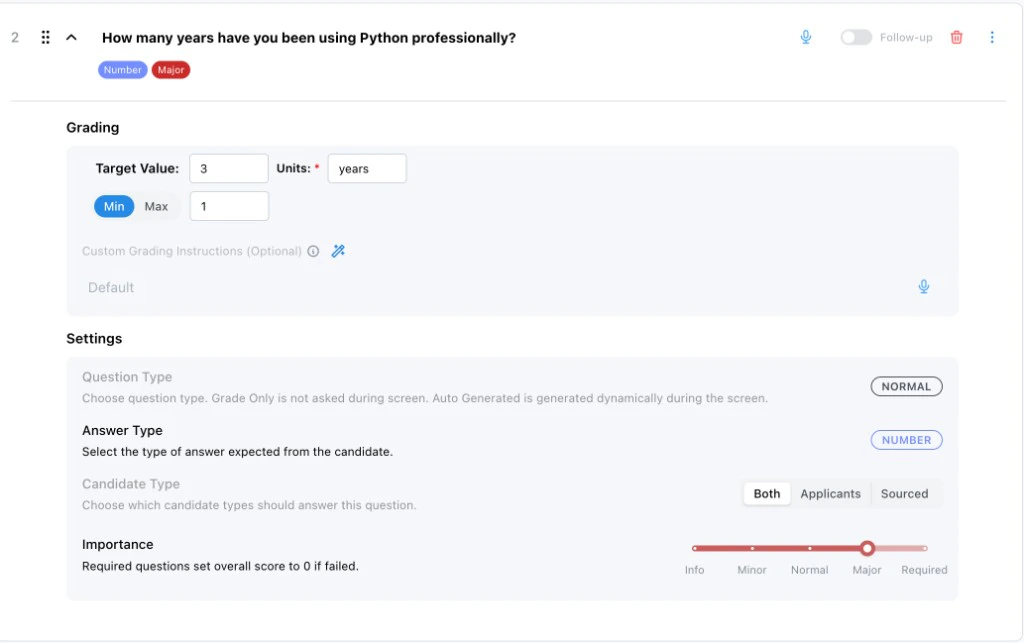
Number answers are for measurable thresholds, such as years of experience, hourly availability, pay
expectations, or number of certifications.
Use the number grading settings to define:
* **Target Value:** The ideal or expected value.
* **Units:** What the number represents, such as years, hours, miles, or dollars.
* **Min or Max:** Whether the candidate must be above a minimum or below a maximum.
### Number
Number answers are for measurable thresholds, such as years of experience, hourly availability, pay
expectations, or number of certifications.
Use the number grading settings to define:
* **Target Value:** The ideal or expected value.
* **Units:** What the number represents, such as years, hours, miles, or dollars.
* **Min or Max:** Whether the candidate must be above a minimum or below a maximum.
 ### Yes/No
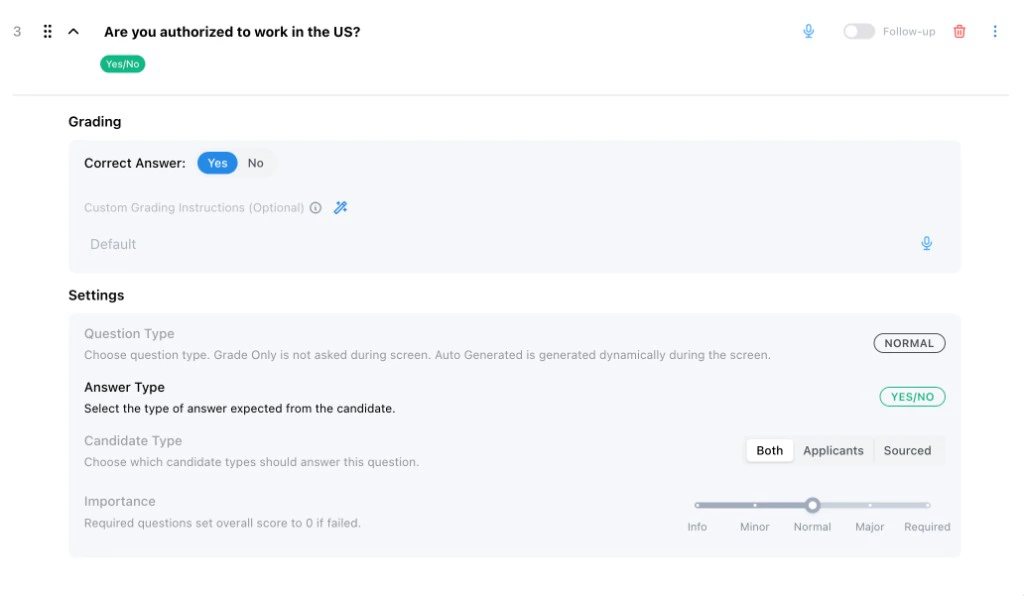
Yes/No answers are best for binary requirements, such as work authorization, willingness to commute,
required licenses, or availability for a shift.
Set the correct answer to **Yes** or **No** so Tenzo knows which response should pass. If the answer
is a hard requirement, raise the importance accordingly.
### Yes/No
Yes/No answers are best for binary requirements, such as work authorization, willingness to commute,
required licenses, or availability for a shift.
Set the correct answer to **Yes** or **No** so Tenzo knows which response should pass. If the answer
is a hard requirement, raise the importance accordingly.
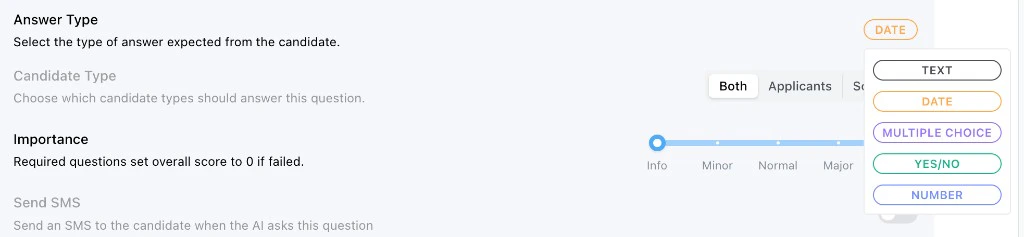
 ### Multiple Choice and Date
Multiple Choice questions are useful when the answer should be one of a known set of options. Each
option can be marked as passing, failing, or informational.
Date questions are useful for start dates, availability dates, certification expiration dates, or
other time-based requirements.
## Follow-Up Questions
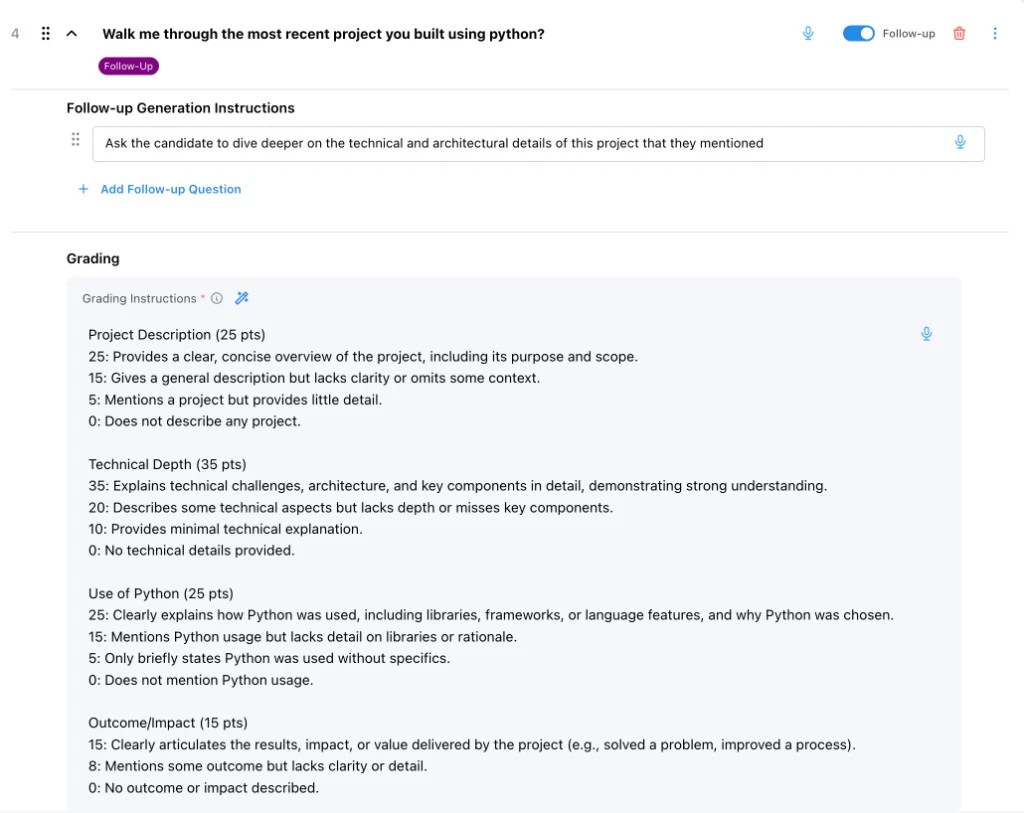
Follow-ups help Tenzo collect enough detail to grade an answer fairly. Enable follow-up when the
initial answer may be too vague, too short, or too important to leave ambiguous.
Use follow-up generation instructions to tell Tenzo what kind of additional detail to ask for. Good
instructions are specific, such as asking the candidate to dive deeper into technical or
architectural details for a project they mentioned.
If a follow-up instruction is left blank, Tenzo uses the default behavior: it generates a clarifying
question that asks the candidate to elaborate on their previous answer. Use a blank follow-up when
you want a generic elaboration prompt, and write custom instructions when you want Tenzo to probe a
specific topic.
Follow-up answers are graded together with the original question. Use follow-ups when you want the
candidate's initial answer and follow-up responses to combine into one grade for a single topic.
### Multiple Choice and Date
Multiple Choice questions are useful when the answer should be one of a known set of options. Each
option can be marked as passing, failing, or informational.
Date questions are useful for start dates, availability dates, certification expiration dates, or
other time-based requirements.
## Follow-Up Questions
Follow-ups help Tenzo collect enough detail to grade an answer fairly. Enable follow-up when the
initial answer may be too vague, too short, or too important to leave ambiguous.
Use follow-up generation instructions to tell Tenzo what kind of additional detail to ask for. Good
instructions are specific, such as asking the candidate to dive deeper into technical or
architectural details for a project they mentioned.
If a follow-up instruction is left blank, Tenzo uses the default behavior: it generates a clarifying
question that asks the candidate to elaborate on their previous answer. Use a blank follow-up when
you want a generic elaboration prompt, and write custom instructions when you want Tenzo to probe a
specific topic.
Follow-up answers are graded together with the original question. Use follow-ups when you want the
candidate's initial answer and follow-up responses to combine into one grade for a single topic.
 ### Verbatim Questions
Use the **Verbatim** question type when the question text must be delivered word-for-word. This is
intended for legal disclosures, EEOC statements, consent language, and other compliance scripts where
paraphrasing or omitting a phrase is not acceptable.
The only text Tenzo will substitute into a verbatim question is template variables that are already
part of the question (such as the candidate's first name or job title). Anything else you want the
candidate to hear must be included in the question text itself.
Verbatim questions can use any answer type and optional follow-ups, like Normal questions. They are
not available as **Grade Only** or **Loop** question types.
## Follow-Ups vs. Auto Generated Questions
Follow-ups and Auto Generated questions both let Tenzo ask dynamic questions based on interview
context. The difference is how the answers are grouped for grading.
* **Use follow-ups** when the extra question is part of the same evaluation. The original answer and
follow-up answers are graded together under one question.
* **Use Auto Generated questions** when the dynamic question should receive its own separate grade.
If you want multiple dynamically generated questions to produce separate scores, create separate
Auto Generated questions.
## Grading Instructions
Grading instructions tell Tenzo how to interpret the candidate's answer. They should be more
specific than the question text.
Good grading instructions explain:
* What a strong answer includes
* What is acceptable but not ideal
* What should be considered weak
* What should be considered disqualifying, if anything
* Whether equivalent experience should count
* Whether the candidate must meet an exact threshold
For text, Resume Based, Auto Generated, and Grade Only questions, grading instructions often look
like a rubric with point values. For Yes/No and Number questions, the structured settings provide
the primary grading rule, and custom grading instructions can add nuance.
Best practice is to provide a rubric that allocates points across the parts of the answer you care
about, with the total adding up to 100. This makes it clearer how Tenzo should trade off different
signals, such as technical depth, recency of experience, communication quality, and role alignment.
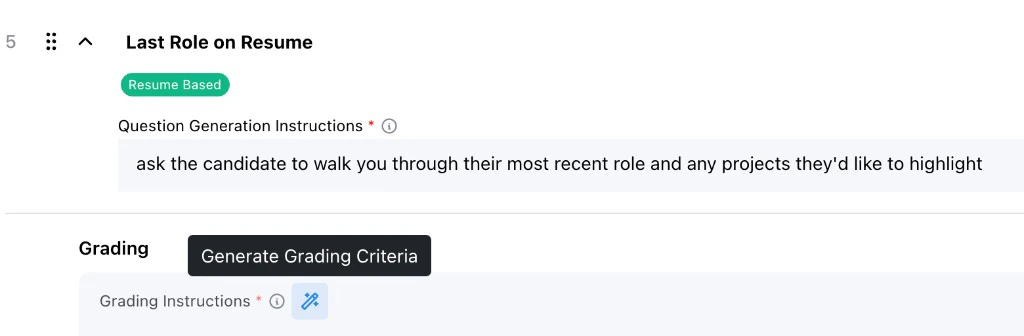
### Generating Grading Criteria
The magic wand can generate grading criteria for a question. Tenzo uses the job description and any
additional generation instructions you provide in the modal.
Use this when a question is directionally correct but needs a clearer rubric. The best additional
instructions describe what the rubric should emphasize, such as technical depth, communication,
recent hands-on experience, or alignment with specific role requirements.
### Verbatim Questions
Use the **Verbatim** question type when the question text must be delivered word-for-word. This is
intended for legal disclosures, EEOC statements, consent language, and other compliance scripts where
paraphrasing or omitting a phrase is not acceptable.
The only text Tenzo will substitute into a verbatim question is template variables that are already
part of the question (such as the candidate's first name or job title). Anything else you want the
candidate to hear must be included in the question text itself.
Verbatim questions can use any answer type and optional follow-ups, like Normal questions. They are
not available as **Grade Only** or **Loop** question types.
## Follow-Ups vs. Auto Generated Questions
Follow-ups and Auto Generated questions both let Tenzo ask dynamic questions based on interview
context. The difference is how the answers are grouped for grading.
* **Use follow-ups** when the extra question is part of the same evaluation. The original answer and
follow-up answers are graded together under one question.
* **Use Auto Generated questions** when the dynamic question should receive its own separate grade.
If you want multiple dynamically generated questions to produce separate scores, create separate
Auto Generated questions.
## Grading Instructions
Grading instructions tell Tenzo how to interpret the candidate's answer. They should be more
specific than the question text.
Good grading instructions explain:
* What a strong answer includes
* What is acceptable but not ideal
* What should be considered weak
* What should be considered disqualifying, if anything
* Whether equivalent experience should count
* Whether the candidate must meet an exact threshold
For text, Resume Based, Auto Generated, and Grade Only questions, grading instructions often look
like a rubric with point values. For Yes/No and Number questions, the structured settings provide
the primary grading rule, and custom grading instructions can add nuance.
Best practice is to provide a rubric that allocates points across the parts of the answer you care
about, with the total adding up to 100. This makes it clearer how Tenzo should trade off different
signals, such as technical depth, recency of experience, communication quality, and role alignment.
### Generating Grading Criteria
The magic wand can generate grading criteria for a question. Tenzo uses the job description and any
additional generation instructions you provide in the modal.
Use this when a question is directionally correct but needs a clearer rubric. The best additional
instructions describe what the rubric should emphasize, such as technical depth, communication,
recent hands-on experience, or alignment with specific role requirements.
 ## Candidate Type
Candidate Type controls who should answer the question:
* **Both:** Ask applicants and sourced candidates.
* **Applicants:** Only ask candidates who applied.
* **Sourced:** Only ask candidates found through sourcing.
Use this when the candidate path changes what you need to ask. For example, sourced candidates may
need a question about interest in the opportunity, while applicants may have already shown interest
by applying.
## Candidate Type
Candidate Type controls who should answer the question:
* **Both:** Ask applicants and sourced candidates.
* **Applicants:** Only ask candidates who applied.
* **Sourced:** Only ask candidates found through sourcing.
Use this when the candidate path changes what you need to ask. For example, sourced candidates may
need a question about interest in the opportunity, while applicants may have already shown interest
by applying.
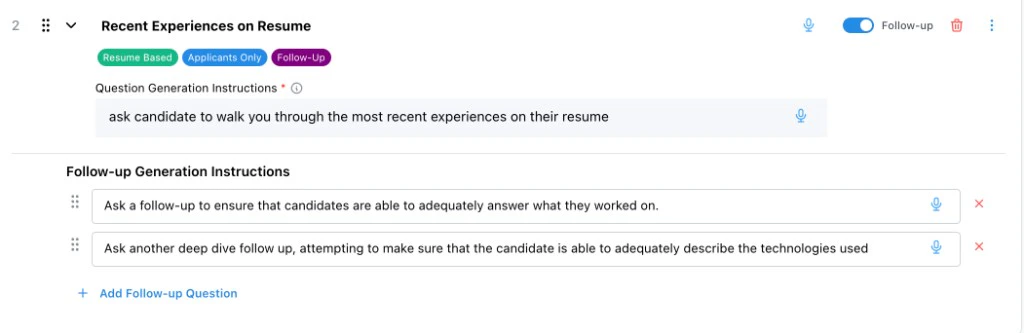
 You might also ask a question only to applicants when you want to verify that they can discuss the
resume they submitted. For example, an applicant-only Resume Based question can ask the candidate to
walk through recent resume experience, with follow-ups that check whether they can explain what they
actually worked on. This is useful when applicants may be applying with an enhanced resume or
spamming applications and you want to confirm they can speak credibly about the experience listed.
For sourced candidates, you may want different questions because they did not apply directly. A
sourced-only question can ask about their current work situation, whether they are open to a new
role, what would make them consider switching jobs, or what timeline they would need before making a
move. These questions help establish interest and availability before evaluating deeper role fit.
You might also ask a question only to applicants when you want to verify that they can discuss the
resume they submitted. For example, an applicant-only Resume Based question can ask the candidate to
walk through recent resume experience, with follow-ups that check whether they can explain what they
actually worked on. This is useful when applicants may be applying with an enhanced resume or
spamming applications and you want to confirm they can speak credibly about the experience listed.
For sourced candidates, you may want different questions because they did not apply directly. A
sourced-only question can ask about their current work situation, whether they are open to a new
role, what would make them consider switching jobs, or what timeline they would need before making a
move. These questions help establish interest and availability before evaluating deeper role fit.
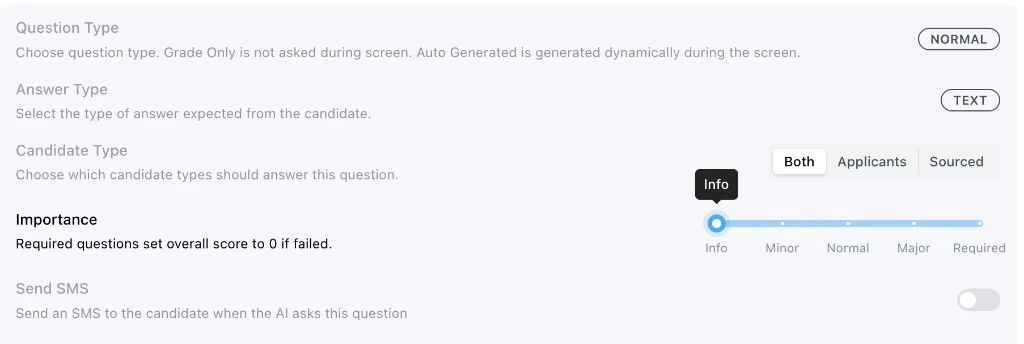
 ## Importance
Importance controls how much the answer contributes to the candidate's final score. Higher
importance levels are weighted more heavily when Tenzo computes the final interview score.
* **Info:** Collects context without treating the answer as a scored requirement.
* **Minor:** Scored signal with less weight than a normal screening question.
* **Normal:** Standard scored screening question.
* **Major:** Scored signal with more weight than a normal screening question.
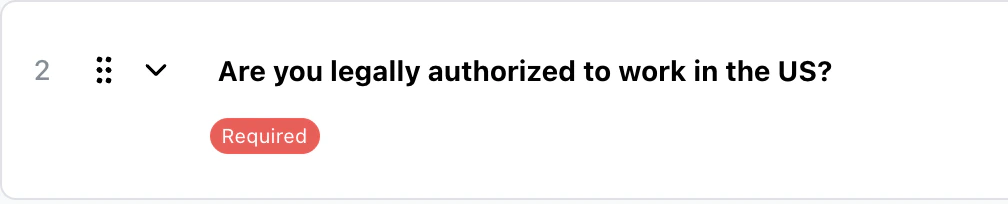
* **Required:** Critical requirement. If failed, the overall score will be set to zero.
Required is best for hard binary requirements where a failing answer should
disqualify the candidate from the interview score. Common examples include
legal work authorization, mandatory certifications, or non-negotiable
availability.
## Importance
Importance controls how much the answer contributes to the candidate's final score. Higher
importance levels are weighted more heavily when Tenzo computes the final interview score.
* **Info:** Collects context without treating the answer as a scored requirement.
* **Minor:** Scored signal with less weight than a normal screening question.
* **Normal:** Standard scored screening question.
* **Major:** Scored signal with more weight than a normal screening question.
* **Required:** Critical requirement. If failed, the overall score will be set to zero.
Required is best for hard binary requirements where a failing answer should
disqualify the candidate from the interview score. Common examples include
legal work authorization, mandatory certifications, or non-negotiable
availability.
 Use **Info** for context you want recruiters to see but do not want to penalize.
 ## Review Checklist
Before activating an interview, review the screening questions and confirm:
* Every question maps to a useful hiring signal
* Question type matches how the question should be asked or graded
* Answer type matches the format you expect from the candidate
* Follow-ups are enabled where clarification matters
* Grading instructions match how your team evaluates candidates
* Candidate type targeting is correct for applicants and sourced candidates
* Importance reflects the real impact of the requirement
Running a test call is the best way to check whether the questions flow well
together and whether your grading criteria are configured and tuned
appropriately.
Screening questions are usually the highest-impact part of the interview. A small improvement to
question wording, type, or grading instructions can significantly improve candidate evaluation
quality.
## Review Checklist
Before activating an interview, review the screening questions and confirm:
* Every question maps to a useful hiring signal
* Question type matches how the question should be asked or graded
* Answer type matches the format you expect from the candidate
* Follow-ups are enabled where clarification matters
* Grading instructions match how your team evaluates candidates
* Candidate type targeting is correct for applicants and sourced candidates
* Importance reflects the real impact of the requirement
Running a test call is the best way to check whether the questions flow well
together and whether your grading criteria are configured and tuned
appropriately.
Screening questions are usually the highest-impact part of the interview. A small improvement to
question wording, type, or grading instructions can significantly improve candidate evaluation
quality.